Setting up Satis on Laravel Forge
We recently needed to set up Satis for private packages at work.
For those not aware, Satis is effectively a static site generator used to serve private Composer packages.
We could have used Private Packagist, but we opted for Satis because we wanted to control authentication and avoid an unnecessary monthly expense (I'm sure it's a good product though!).
Setting up the site
The first step is to create a new site in Forge. We're going to put it on an existing server, but you could just as easily provision a new one for it.
Satis only requires PHP for the build process, not for actually serving the site, so select “Other” as the site type:
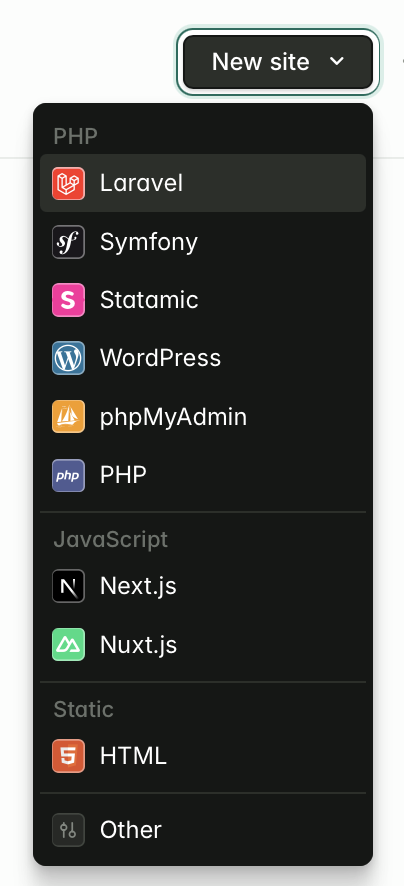
Go ahead and continue to create the site with your desired domain. You don't need to select a repository.
Once the site is created, you'll want to SSH into the server and cd into the site's directory.
Here, you'll create the Satis project inside your site directory:
composer create-project --keep-vcs --no-dev composer/satis:dev-main
The next thing you need to do is create a satis.json file defining which repositories/packages should be served by Satis.
In our case, we only want to serve one repository:
{
    "name": "statamic/satis",
    "homepage": "https://private-packages.statamic.dev",
    "repositories": [
        {
            "type": "vcs",
            "url": "[email protected]:statamic/private-addon.git"
        }
    ],
    "archive": {
        "directory": "dist",
        "format": "zip",
        "skip-dev": false
    },
    "require-all": true
}
^ Obviously, this is not the real name of our private package. 😉
Deploying
Next, we need to edit the deployment script to build the necessary files when we deploy:
cd /home/forge/private-packages.statamic.dev

php satis/bin/satis build satis.json public
The build output needs to go into the public directory, since that's where Forge serves sites from.
To trigger a deployment when we release a new version of our package, we can create a GitHub Actions workflow triggered whenever a release is published:
name: Satis

on:
  workflow_dispatch:
  release:
    types: [published]

jobs:
  rebuild-satis:
    name: 'Rebuild Satis Repository'
    runs-on: ubuntu-latest

    steps:
      - name: Deploy
        uses: jbrooksuk/[email protected]
        with:
          trigger_url: ${{ secrets.SATIS_TRIGGER_URL }}
You will need to add a SATIS_TRIGGER_URL actions secret to your repository containing the site's deploy hook URL.
The workflow_dispatch trigger also lets you run the workflow manually from the Actions tab, which is handy for testing.
Deploying for the first time
The moment of truth... click “Deploy” and see what happens ⏰
Did it fail? Depending on your setup, you may need to add a deploy key to GitHub so Composer can pull down your repository (if your server already has access to the repository, you can skip this).
If you SSH into the server and run the build command manually, it will give you the steps to set this up.
Once complete, deploying again should hopefully work! 🤞
To test, add the package to your composer.json's require array and define the repository:
{
	"require": {
		// ...
		"statamic/private-addon": "*"
	},
    "repositories": [
        {
            "type": "composer",
            "url": "https://private-packages.statamic.dev"
        }
    ],
    // ...
}
Running composer update statamic/private-addon should pull down the package from your Satis server 🎉
Handling authentication
If you want to require authentication, I found this post from Alex Vanderbist (of the Spatie team) really helpful.
We created an API endpoint in our Laravel app to handle authentication requests. The controller looks a little something like this:
<?php

namespace App\Http\Controllers;

use App\Http\Controllers\Controller;
use App\User;
use Illuminate\Http\Request;
use Illuminate\Http\Response;
use Illuminate\Support\Timebox;

class SatisAuthenticationController extends Controller
{
    public function __invoke(Request $request): Response
    {
        return (new Timebox)->call(function ($timebox) use ($request) {
            $email = $request->getUser();
            $password = $request->getPassword();

            if (! $email || ! $password) {
                return $this->invalid();
            }

            $user = User::query()
	            ->where('email', $email)
	            ->where('some_tokeny_thing', $password)
	            ->first();

	        return $user?->isSpecial()
	            ? $this->valid()
				: $this->invalid();
        }, 200 * 1000);
    }

    private function valid(): Response
    {
        return response('Authorized', 200);
    }

    private function invalid(): Response
    {
        return response('Unauthorized', 401);
    }
}
^ We use Laravel's Timebox class here to ensure that the request always takes a fixed amount of time to execute, avoiding potential timing attacks.
Then, in our Nginx config file, we proxied HTTP Auth from Composer to our API endpoint:
location / {
	# Satis UI and packages.json file publicly available

	try_files $uri $uri/ /index.php?$query_string;
}

location ^~ /dist/ {
	# Package downloads require authentication using
	# the internal auth endpoint found below.

	auth_request /_oauth2_token_introspection;
	try_files $uri $uri/ /index.php?$query_string;
}

location = /_oauth2_token_introspection {
	# Forward the request, including basic auth headers
	# to our Laravel app.

	internal;
	proxy_method POST;
	proxy_set_header Accept "application/json";
	proxy_set_header X-Original-URI $request_uri;
	proxy_set_header Host statamic.com;

	proxy_ssl_server_name on;
	proxy_ssl_name statamic.com;

	proxy_pass https://127.0.0.1/api/satis-authentication;
}
Because we're hosting the Satis site on the same server as our main Laravel app, we point to 127.0.0.1 to skip an unnecessary DNS lookup, set the Host header and SNI name to statamic.com so the app and its certificate still match.
If you're not doing that, you can remove these lines:
proxy_set_header Host statamic.com;

proxy_ssl_server_name on;
proxy_ssl_name statamic.com;

proxy_pass https://127.0.0.1/api/satis-authentication;
proxy_pass https://statamic.com/api/satis-authentication;
Support my work
If you found this post helpful, consider sponsoring me on GitHub. It helps me keep writing and maintaining open source projects like Runway.